You probably ran across the term SEO if you dipped your toes into the waters of modern world wide web, and you are most likely already aware of its potential as well as importance in terms of digital marketing.
SEO stands for Search Engine Optimization; you possibly bumped into some other terms related to SEO, such are keywords and perhaps back linking.
Having good Search Engine Optimization is one of the key components in getting traffic to your website and enhancing your overall online visibility.
In this article we’ll go through the basics of Search Engine Optimization in general, and we’ll also provide some practical examples by optimizing via one of the themes we developed.
Hopefully by the time you have finished reading this article you’ll have a clearer idea on what SEO is, and how to apply what you learned on your end, complete with different techniques, approaches and tools you can use. In this article we will be relying on the SEO options in our (Qode Interactive) themes, paired with examples using the Yoast SEO plugin, which is fully compatible with our themes.
Here’s a general overview of subjects we will be covering:
- What is SEO – a general overview and explanation
- How does SEO work
- Tips and tricks you can apply to your WordPress website
- Compatibility and usage of Yoast SEO plugin
SEO is comprised of a handful of techniques which you can use to optimize your website for search engines. So it’s all about you and how you will optimize your website; it’s about fine tuning your content so that search engines like Google and Bing can access it, index it, and of course most importantly, rank it.
Naturally, ranking high or higher than your competitors and websites in the similar niche as yours is paramount.
It’s a widely known and documented fact that most people while searching the web click only the first few websites that appear on the first page of results. So positioning your website high on search engine results pages (SERP) should be of great value to everyone looking to succeed online.
If you do not have your content optimized, search engines will effectively not know how to rank it; when people look up one of the terms relevant for your website, they may not necessarily find your website as it could be positioned low on the results page. This in turn results in weak traffic, which is never good for any website.
Many things have changed since the beginning of SEO and SEM (Search Engine Marketing), and they keep evolving constantly. As of 2019 the entire process shifted its focus to be more concentrated on the users, your potential customers and visitors, as opposed to being completely automated and machine operated.
This effectively means that, unlike several years ago, it is no longer a good practice to just go ahead and fill your website with a huge number of keywords; you can now actually focus on providing your users the best possible experience.
Although understanding what your users search for and how they go about it may require a bit of investigative work, you’ll sure see the benefits once you get a grip on that.
How Does A Search Engine Work Then?
Search engines interact with websites using 3 different operations; they crawl, index and then rank your website.
Crawl – this process signifies the activity when a search engine uses its crawlers, or bots, affectionately called that because this process involves these search bots wandering around all corners of the web, visiting different websites and going through all their content, all while collecting different data about website content and structure.
Indexing – this process involves storing and organizing the data that the crawlers have collected. This step is crucial because your website cannot be ranked and displayed on SERPs if it has not been indexed first.
Ranking – this is by far the most important part of the process for sure. When all data has been collected and indexed, then search engines can process the results and finally order the pages, ranking them on par to content-wise similar already existing pages on the web. Pages that correspond to user queries the best are the most relevant ones, and they get ranked higher.
ON site Optimization
Now we will go through WordPress settings and options in our themes that can make Search Engine Optimization easy and smooth.
Since you’ve chosen WordPress as a platform for your website, you have effectively already stepped in to the world of SEO. WordPress is very well optimized for search engines, and we’ll take a closer look into this now.
SEARCH ENGINE VISIBILITY
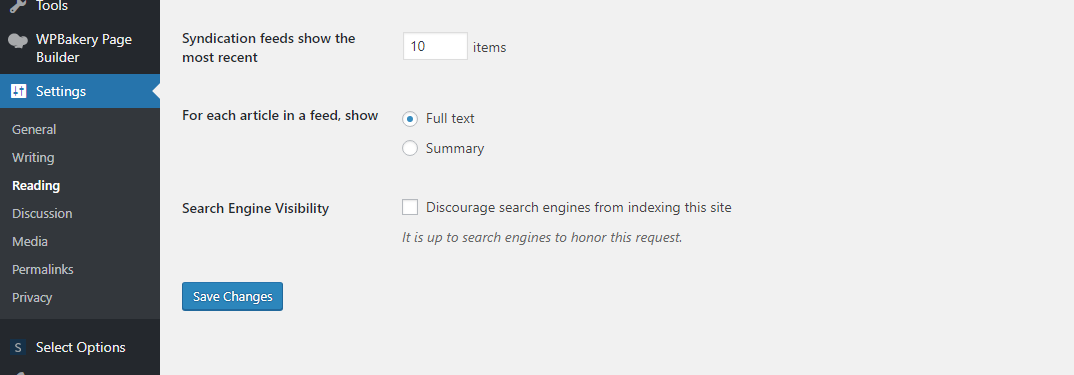
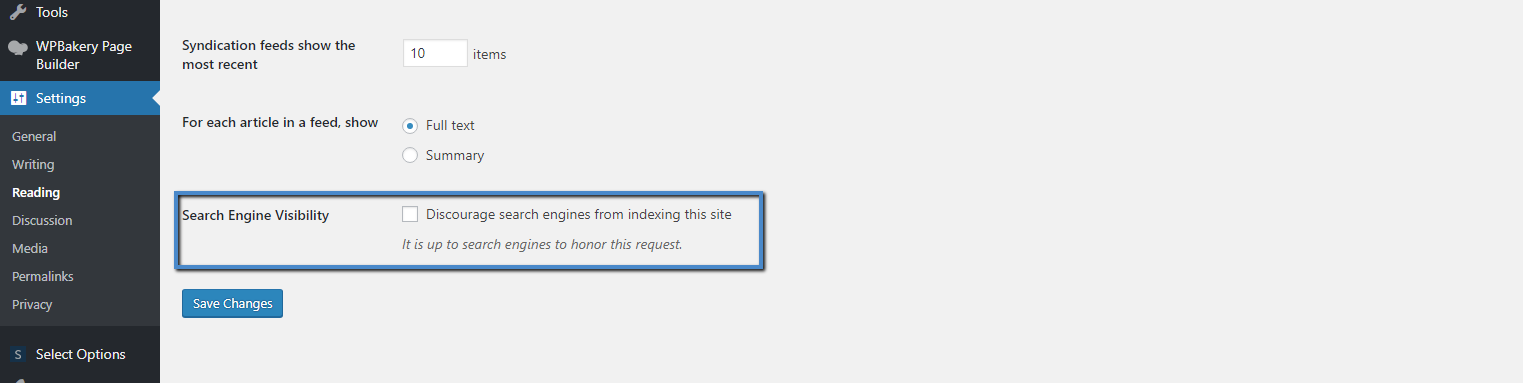
There is a built-in option in WordPress that enables you to hide your website from search engines. If this is by any chance enabled once you have created your site, please navigate to Settings > Reading and uncheck Search Engine Visibility.
The purpose of this option is to hide your site while you are still developing it; by the time its up and running, it may sometimes happen that this setting stays checked.
If it is checked it will prevent you from being visible and will stop crawlers from indexing your site. So please once you are done developing your site navigate to Settings > Reading and uncheck that field so you can get indexed.
USING SEO FRIENDLY URL STRUCTURE
SEO user-friendly structure signifies a URL that contains words that clearly describe what is inside the content of the page. This will make the URL easily readable to both humans and search engines.
So an example of user friendly URL would be:
www.yoursite.com/user-friendly-url
Instead of using some other URL structure as:
https://www.yoursite.com/archives/1234
https://www.yoursite.com/?p=1234
The entire point is to make it clearly visible and descriptive. The URL structure should describe the content of the corresponding page so that both users and crawlers can guess what the actual content of the page is simply by looking at its URL.
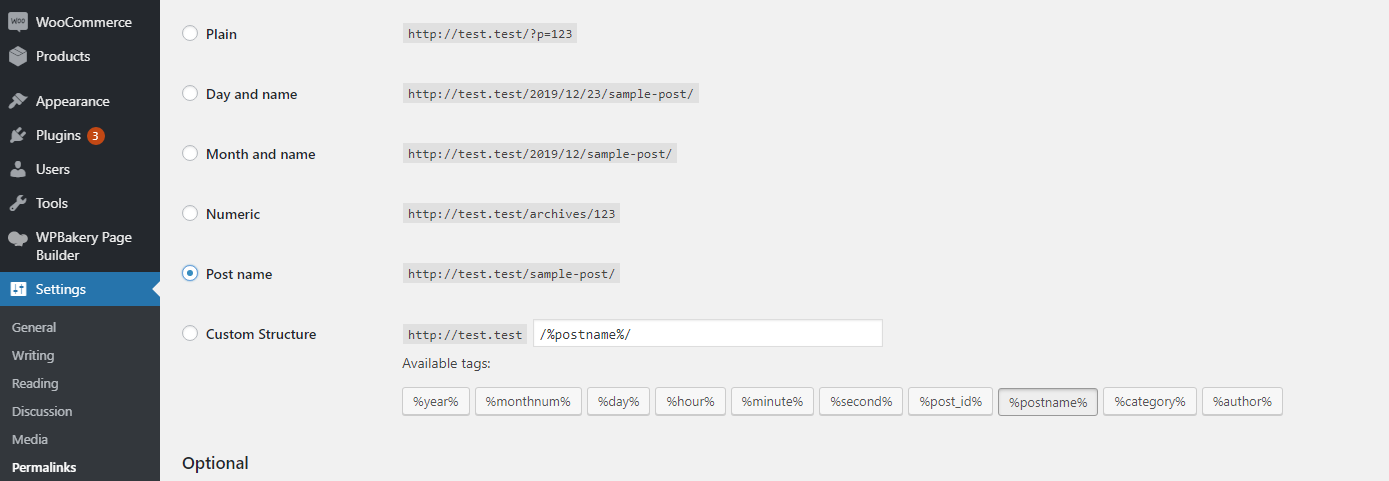
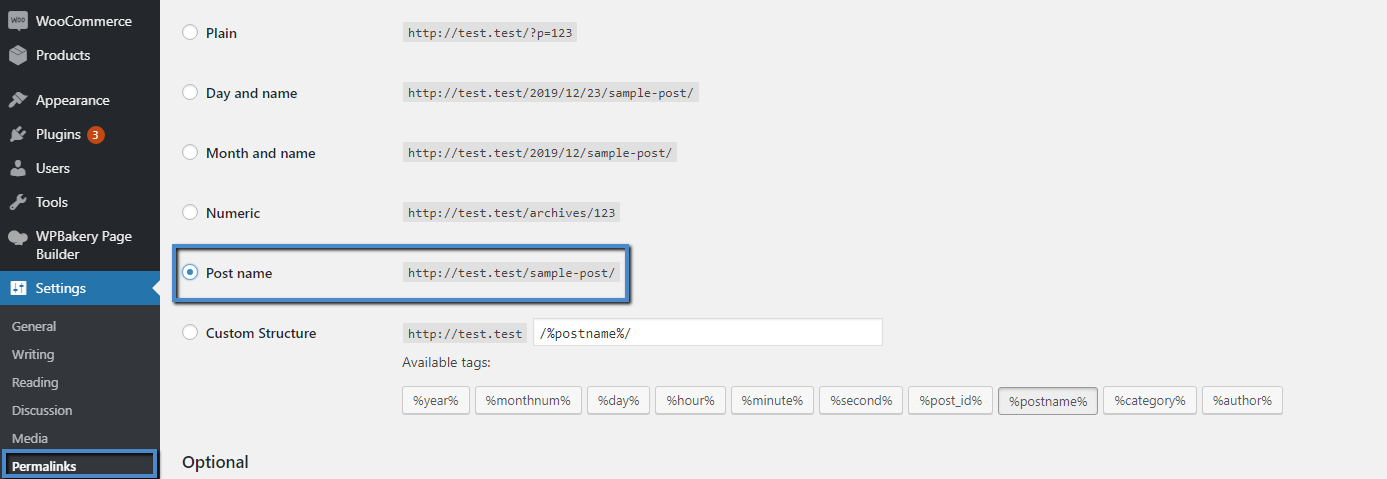
To configure your URL structure please go to Settings > Permalinks and choose the Post name option; make sure to Save your changes so that your settings can be applied.
WWW or non-WWW website
Despite a seemingly ongoing debate amongst many online participants, it should not matter if you use a WWW or non-www website, as this is not more than a personal preference, and if you are an average user there is no difference at all using either one of these approaches.
However, the most important part is that you choose one of the two and stick with it. So it’s a good idea not to change your site URL in some part of the development; search engines consider www and non-www URLs to be different websites so it is very important to choose one structure and use it on all your pages.
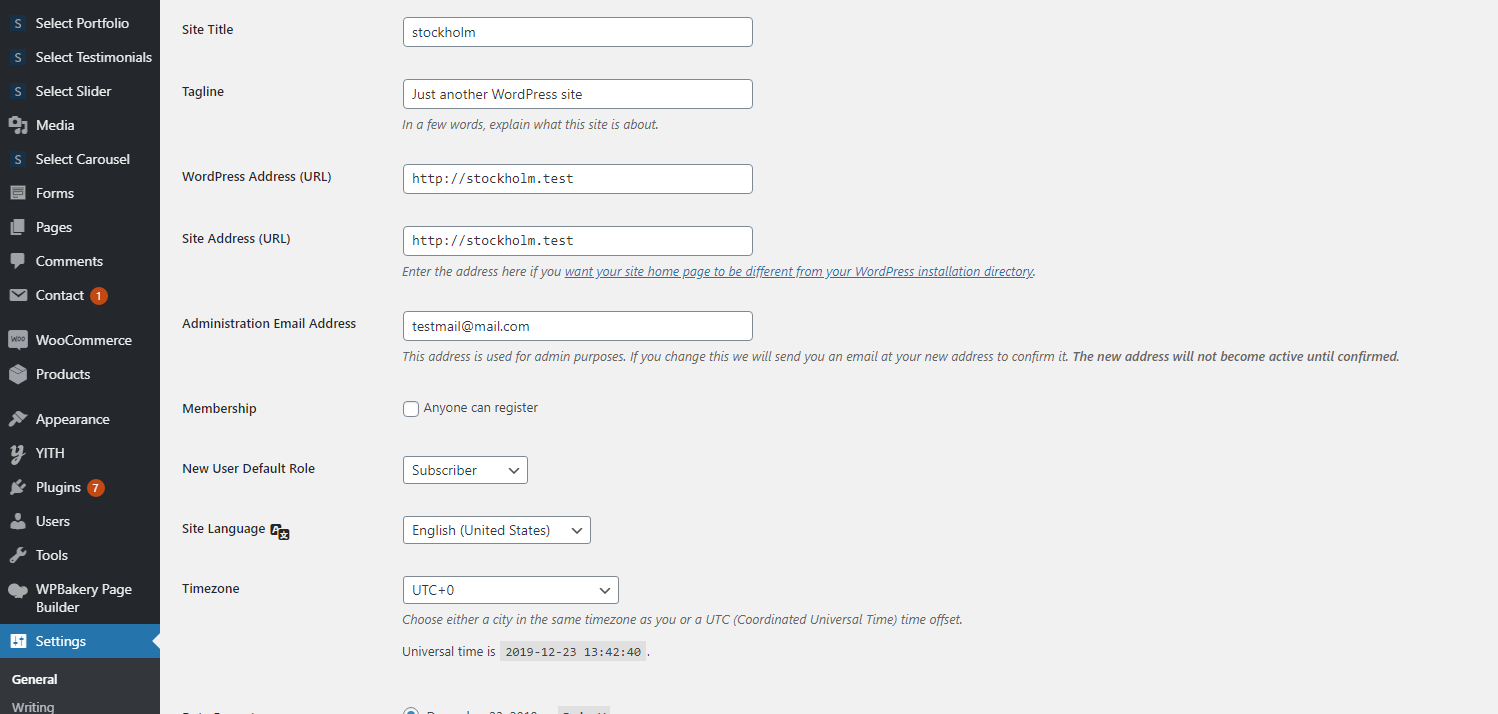
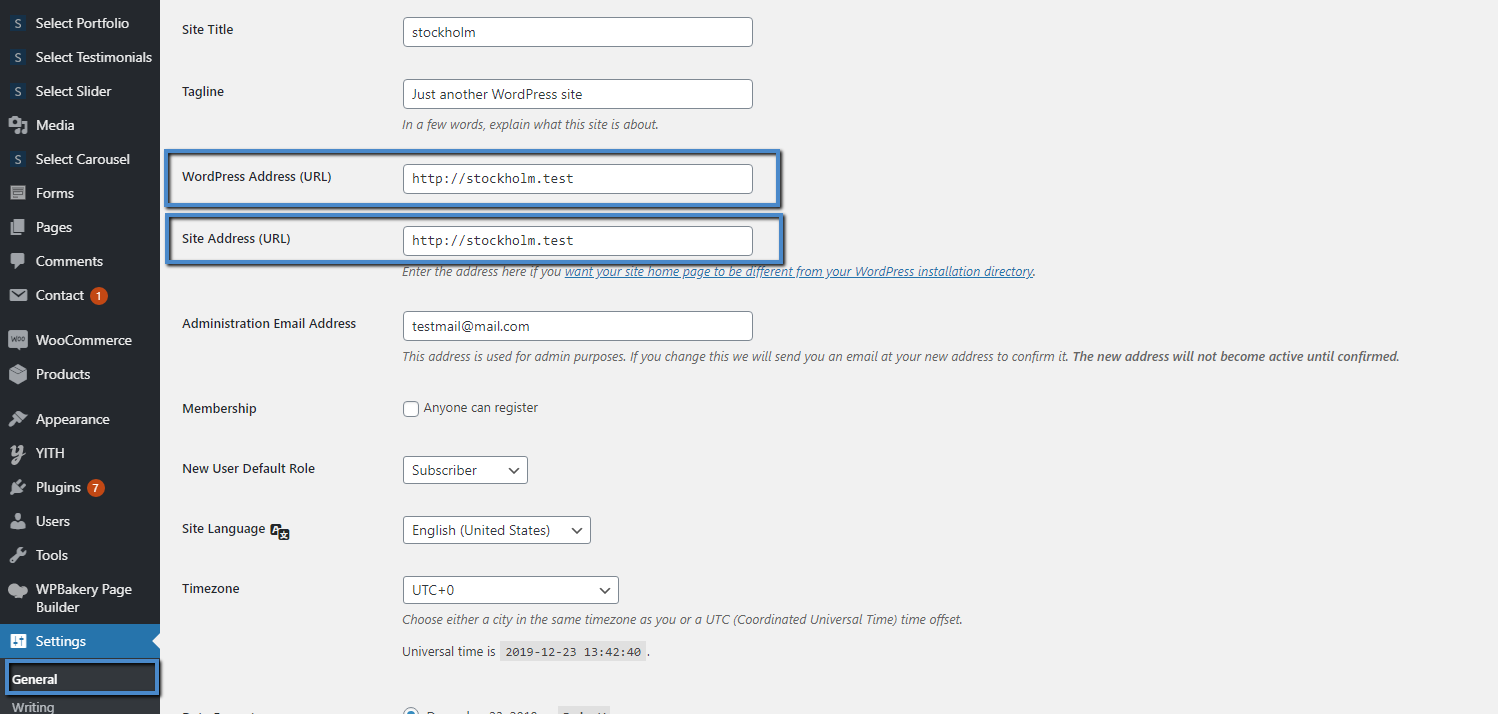
In Settings > General you’ll find WordPress Adress URL and Site Adress URL fields where the address should be set the same for both.
SEMANTIC MARKUP
This is perhaps one of the older techniques but it can make a difference. Google even recommends using XHTML semantics.
This approach comes down to using heading tags for your text in a strategic way, by highlighting specific textual content and letting crawlers know that this content is the most relevant on your page. Crawlers can then easily rank your page in searches for the relevant keywords corresponding to words or terms you decided to use larger heading tags for. This is something that’s always good to bear in mind and apply.
SITEMAP
A sitemap is all your content and pages on your website compiled as a hierarchically organized list. This means that sitemap provides users with a quick way to see everything that your site includes. Some time ago the purpose of sitemaps was mainly to help people navigate through your website; you should know that their main purpose nowadays is to communicate the information to the crawlers (search engine bots).
Having a Sitemap on your website does not guarantee boosting your site into the highest rank immediately, but it is still considered a great SEO tool as it makes it easy for the crawlers to access all your content and understand the relations between different pieces of content. This will surely make it easier for search engines to index your site and point out the relevant content to your users’ searches.
You could create a Sitemap with the help of a plugin called Yoast SEO which is fully compatible with our themes, and we will go through this in more detail in a bit.
IMPORTANCE OF HEADINGS
As we mentioned above in the Semantic markup section, headings are surely of great importance when it comes to adding your content. They will help crawlers to see how your site is organized, and it focuses on the content itself.
You can change heading tags using the default WordPress formatting options for text. If you wish to have a well-organized website, you should use the heading tags wisely. Do note that it is advisable to have only one H1 heading per page, and you should always pay attention to how you structure the content and the headings on your pages. For example, it’s not advisable to use the h1 tag in the sidebar; preferably it is more wisely to have an h4/h5 heading as the content in the sidebar is less important than your main content.
A far better solution for this type of section is to use h4/h5 heading tags, as the content in the sidebar is less important than your main content, which is what you ideally wish the searches to focus on.
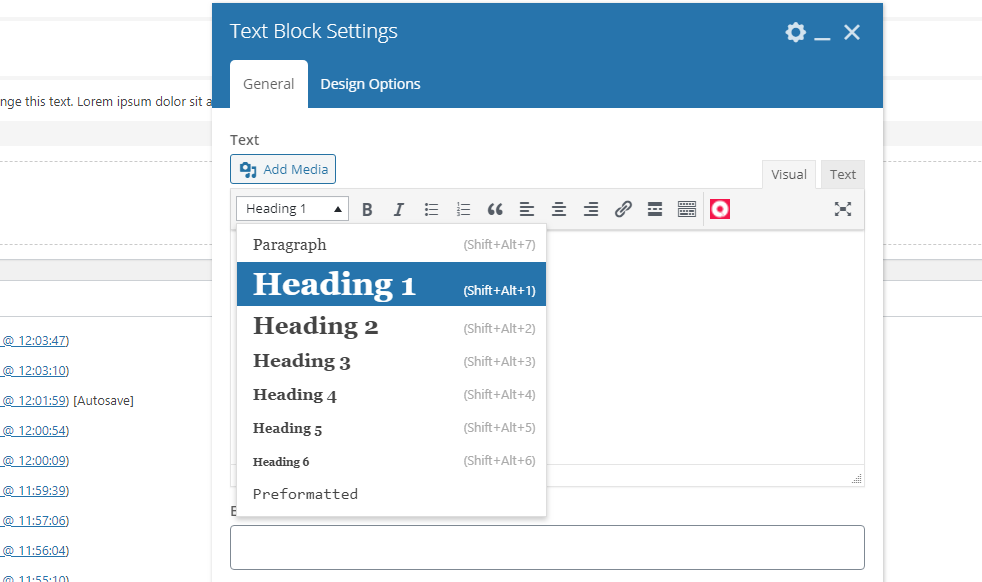
So you will always have the option to structure your content, making the text readable as well as they for sure have visual benefit. Imagine only that having site content look the same, it must be very boring and hard to read.
Aside from having SEO benefits, heading tags can also contribute to better visual hierarchy on your pages and improve readability. Well-structured content will enable crawlers to really understand how your content is built and organized, and that is precisely what the primary goal of using heading tags is.
INTERLINKING and EXTERNAL LINKS
One more thing you should pay special attention to is link building on your site. So whether it is about Interlinking or about optimizing External links, it’s always a good idea to focus on your linked text (anchor text), chiefly because it is being used by search engines as a signal sent from one site to another, where these websites mutually describe each other. So for example if you are selling headphones, you should at least have the term ‘headphones’ in your anchor text.
Another thing that can have a great impact is getting a solid number of links from different websites.
Interlinking is a good practice as it enables bots to easily navigate through your site and find other content and pages. It is a good idea to consider using something we call breadcrumbs in your website navigation.

External links, or Backlinking as it is otherwise called, is as simple as it sounds. It’s a process all about linking from one website to another. However, you should be careful, as it is not a matter of having as many links to e.g. a couple of other sites; it is more about having high quality links from one site to another, as this will let search engines know that your content is noteworthy.
There are two types of backlinks: NoFollow and DoFollow
NoFollow links are, as the name says, links that are not of importance to the ranking. They will get passed once your site is indexed and they do not make any impact on the rank of your site.
DoFollow links are the ones that matter and are most valuable in terms of SEO; a high-quality link can for sure improve your ranking. However you should note that not just any DoFollow links will do; some of them, coming from suspicious sites, can be considered actually really bad for your ranking, and you can get penalized by Google for this. So have in mind that it is not about quantity in links - rather it is more about having good, quality links to make an impact on your ranking.
SITE SPEED AND SECURITY
Even if you have done everything and followed all SEO tips, if the load times on your site are bad, or in the event, it got attacked by a hacker, your ranking can suffer.
Having a well-optimized site in terms of speed is of great importance. In some cases, you will only have a few seconds for presenting your site to your visitors. These seconds are of great of value, as this is precisely when the users will decide whether they will stay on your site or just click away.
You can read more on this in our article about improving your website speed.
OUR THEME OPTIONS FOR SEO
This is probably a lot information to handle if you are a total newbie, but there’s no reason to fret. As we mentioned earlier, if you have selected WordPress as a platform for your new website, you have already stepped in to the world of SEO, as WordPress is very well optimized for search engines.
Another vital point is the On-site optimization; this is an optimization process which primarily involves your website content.
In the steps that follow we will go through some of the options found in our themes, and we’ll cover all the options that can help you boost your rankings.
With our themes, you can find a field located in the Global Options > General where you can choose to enable or disable options for SEO.
By navigating to Theme Options > General > SEO and enabling the option found there, you will see fields for Meta Keywords and Meta Description.
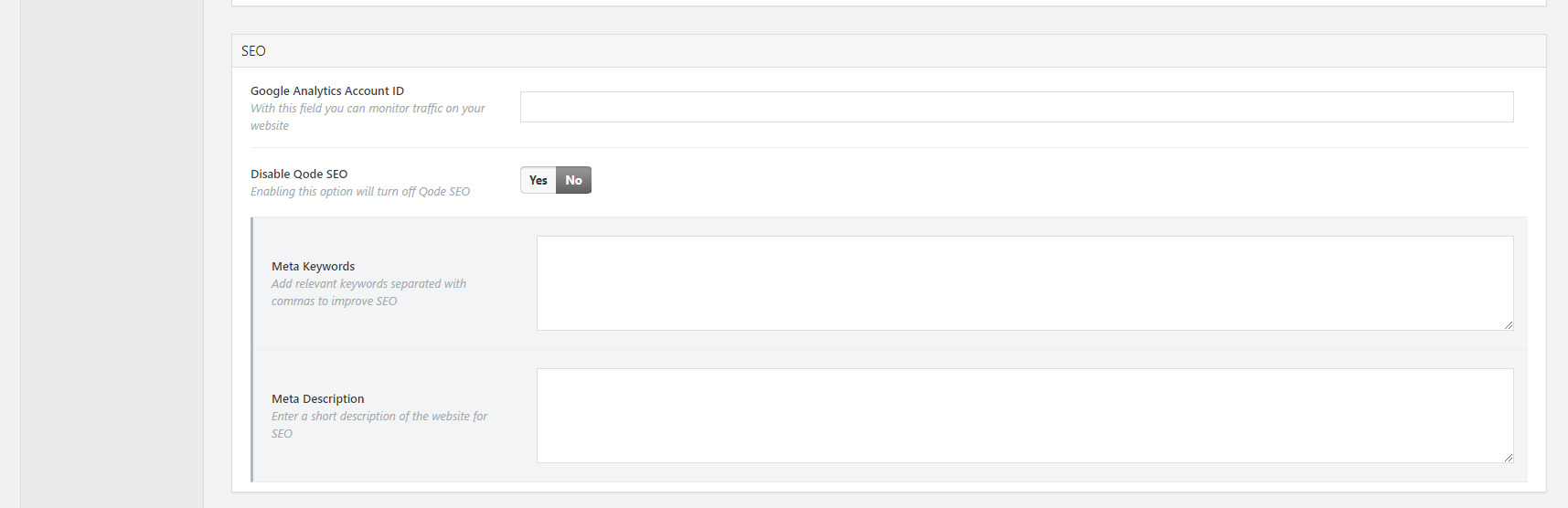
This is where you will be able to add your relevant keywords and a short description of your website. You need to know that keywords are all about providing your users with what they are looking for.
Earlier in the days you could probably have written any article and stuffed it with different keywords, and you’d be set. However nowadays it is a bit different, and you should be careful when choosing the right keywords for your content as it might happen that Google will penalize you for tackling this the wrong way. So you should be careful and pay extra attention; make sure to have grammatically correct and relevant content, and your choice of keywords should feel natural. It is a good idea to pay extra attention to this and provide your users with the greatest possible online experience.
ON page fields
There are also SEO options for your single pages; here you can add a custom SEO title and as well add your Keywords to the page and its meta description.
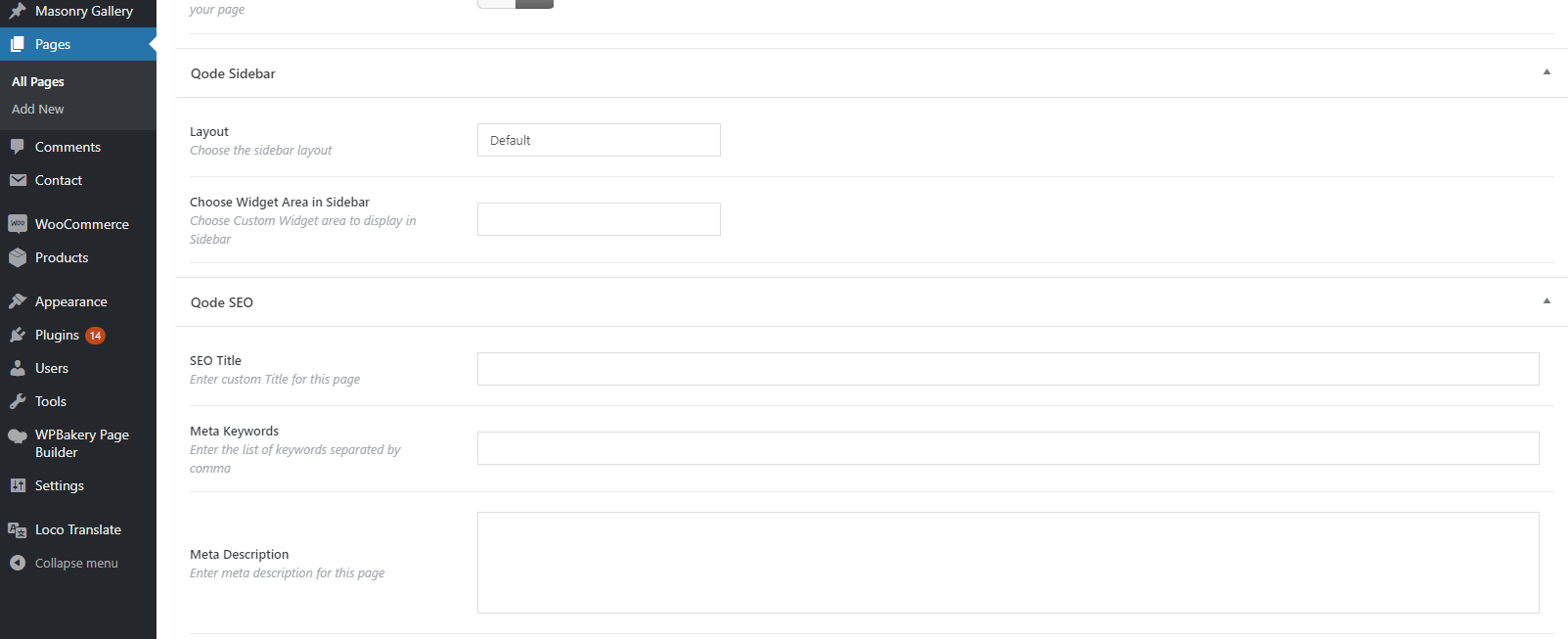
Image Optimization and ALT tag
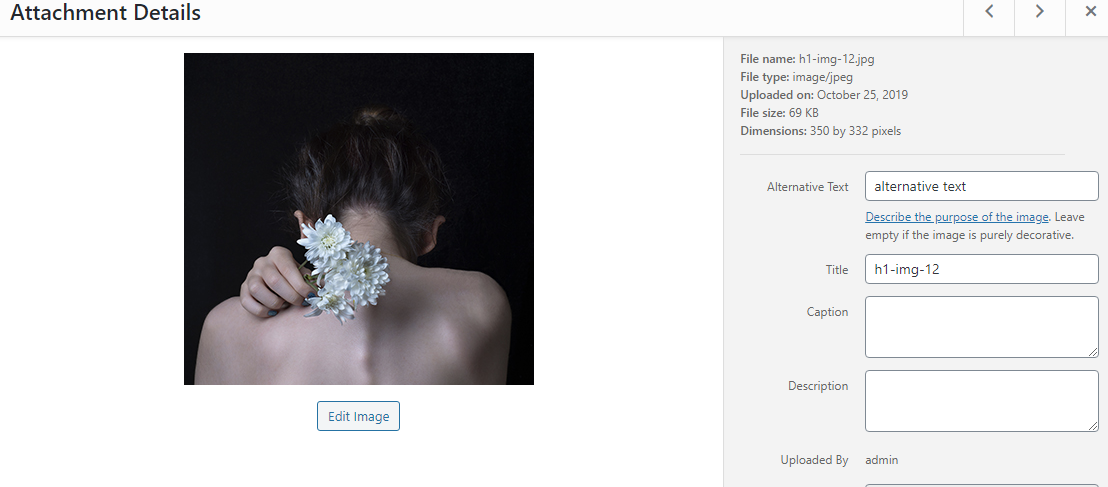
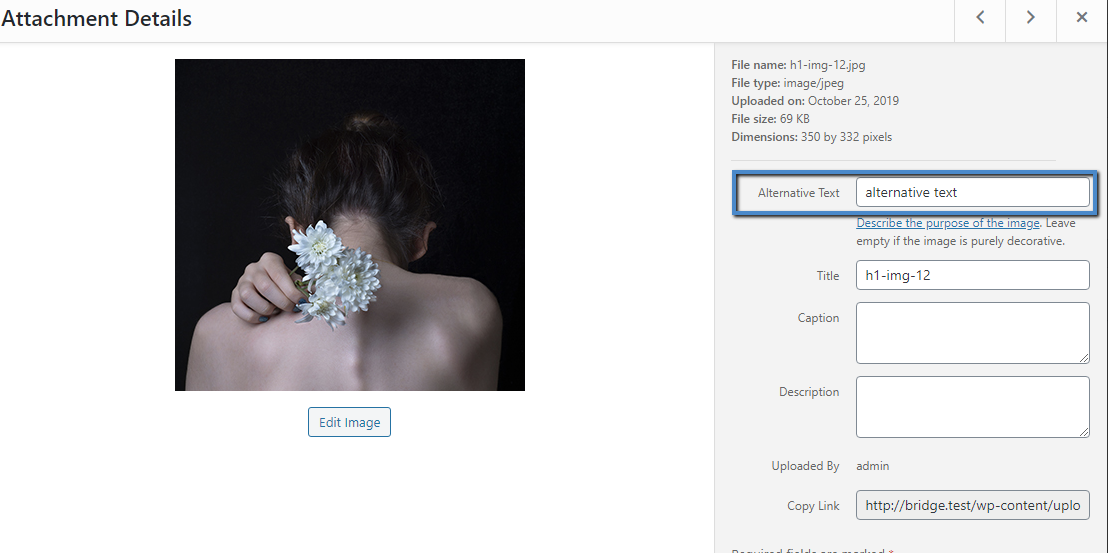
Nowadays every website contains images, and it is probably impossible not to have any on your site. So please note the importance of optimizing these images. If your images are well optimized you can for sure bring traffic to your site with more ease. It is a good practice while adding an image to a page to enter the ALT tag for every image. You can also add additional keywords in there as well. Note that leaving the fields for additional keywords empty may make your website XHTML unfriendly, and it will disable crawlers from knowing what the images are about. It is as simple as it sounds and does not take a lot of your time, but can make a difference for sure.
TRACKING YOUR RESULTS
After you have done all the suggested operations, it is now time to track and measure the results.
You can use Google Analytics for this purpose, as they will give you great insight on the results. Do make sure to connect your Google Analytics account to your Google Search Console account, as only then will you have access to certain metrics.
The Analytics should be monitored quite often to give you a better grip on the impact of the results.
SEO Plugins
When it comes to the usage of certain SEO plugins, you will probably end up with a few of them worth what they stand for. As for our themes, we made sure they are all compatible with the YOAST SEO plugin which you can use to make optimizing your site for search engines easy and straightforward. However, do note that if you choose this option please disable the SEO options found directly in our themes, so that the content does not get duplicated.
YOAST SEO is probably one of the best plugins on the market when it comes to SEO, and as we mentioned it is compatible with our themes.
Let’s get started with the basics of this plugin and the ways in which it improves your ranking.
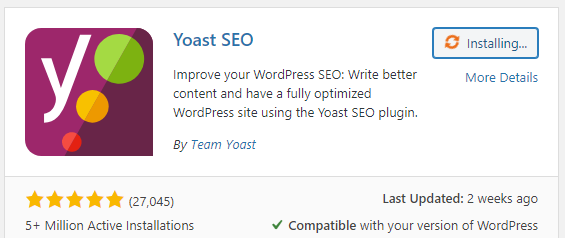
Yoast SEO plugin helps to optimize your site properly, and it has fields for inserting keywords and key phrases to your content. It also includes fields for your title and Meta description on any page of your site, as this proved to be one of the best ways to help ranking high on search engines.
Yoast can calculate the best way to optimize your content. With the help of this plugin, you can determine how you should use keywords and how many times you can use them to satisfy SEO standards, and it makes sure that your content is search-friendly.
Its features focus on many aspects of SEO, such as keywords in headings, meta descriptions, and page/post URLs, internal and external linking, post mages, and it also tells you whether your meta descriptions are too long or short, just to name a few of its benefits.
To keep things short there are simply many profits that you can get using this plugin, as it provides you with guidance and suggestions regarding every possible segment you can cover to rank higher.
We will not delve particularly deep into the usage of this plugin here, rather we wanted to point out that it is compatible with our themes, and that we strongly recommend using it for better performance.
SUMMARY
We know SEO might seem like much to handle if you are a newbie, however, this article does go through every possible step which can help improve your ranking. The key is to understand the importance of having an SEO-optimized website, and that by following this guide you can help your website on its way up in the search engine rankings.